Transformation (PCA)
Several transformation methods are available in the EnMAP-Box. You can find them in the Processing Toolbox under . The usual way to apply these methods is to use a Fit … algorithm first and then apply it to an image with Transform raster layer.
This recipe demonstrates the basic workflow of applying transformations using a principle component analysis (Fit PCA) and the test dataset.
See also
You can find all the available transformation algorithms here.
Open the test dataset
In the processing toolbox go to
- Specify
enmap_berlin.bsqunder Raster - Under Output Transformer specify an output file path and click Run
- Specify
Now open
- Select
enmap_berlin.bsqas input Raster - Under Transformer click … and select the output
.pklfile from the Fit PCA algorithm - Specify an output filepath for the transformed raster under Transformation and click Run
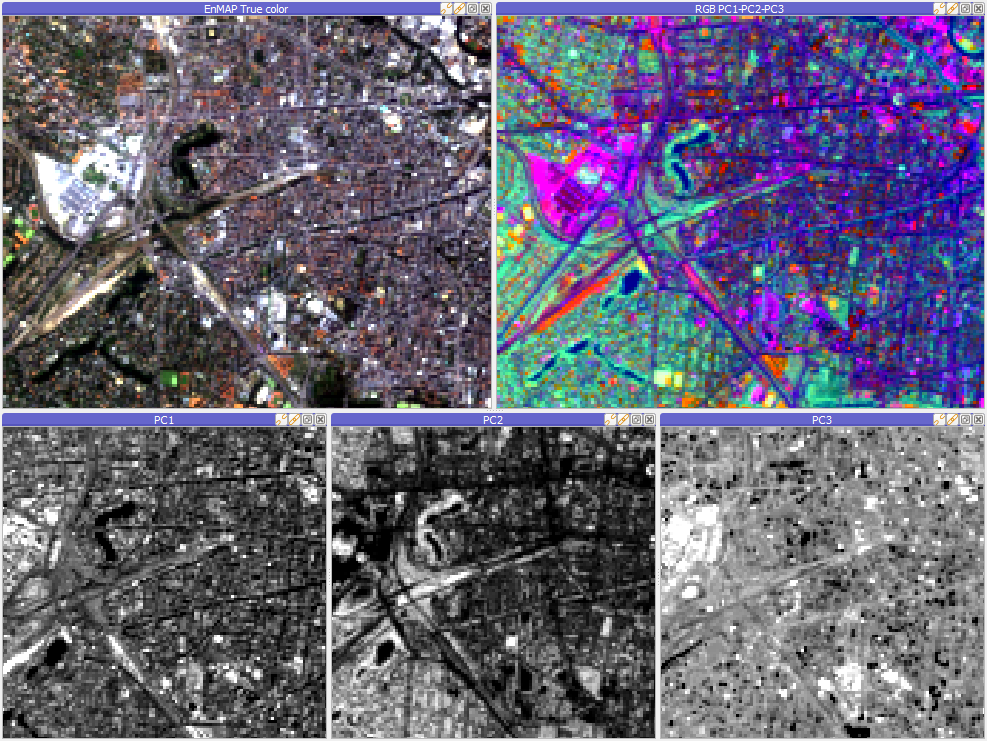
Results of a PCA transformation: input image on the upper left, RGB representation of the first 3 components on the upper right and singleband gray visualisation of the same components on the bottom.
- Select