Clustering (kmeans)
Several clustering methods are available in the EnMAP-Box. You can find them in the Processing Toolbox under . The usual way to apply these methods is to use a Fit … algorithm first and then apply it to an image with Predict (unsupervised) classification layer.
This recipe demonstrates the basic workflow of applying clusterers using K-Means clustering (Fit KMeans) and the example data.
See also
You can find all the available clustering algorithms here.
Open the test dataset
In the processing toolbox go to
Specify
enmap_potsdam.tifunder RasterUnder Output Clusterer specify an output file path and click Run
Now open
Select
enmap_potsdam.tifas input RasterUnder Clusterer click … and select the output
.pklfile from the Fit KMeans algorithmSpecify an output filepath for the transformed raster under Clustering and click Run
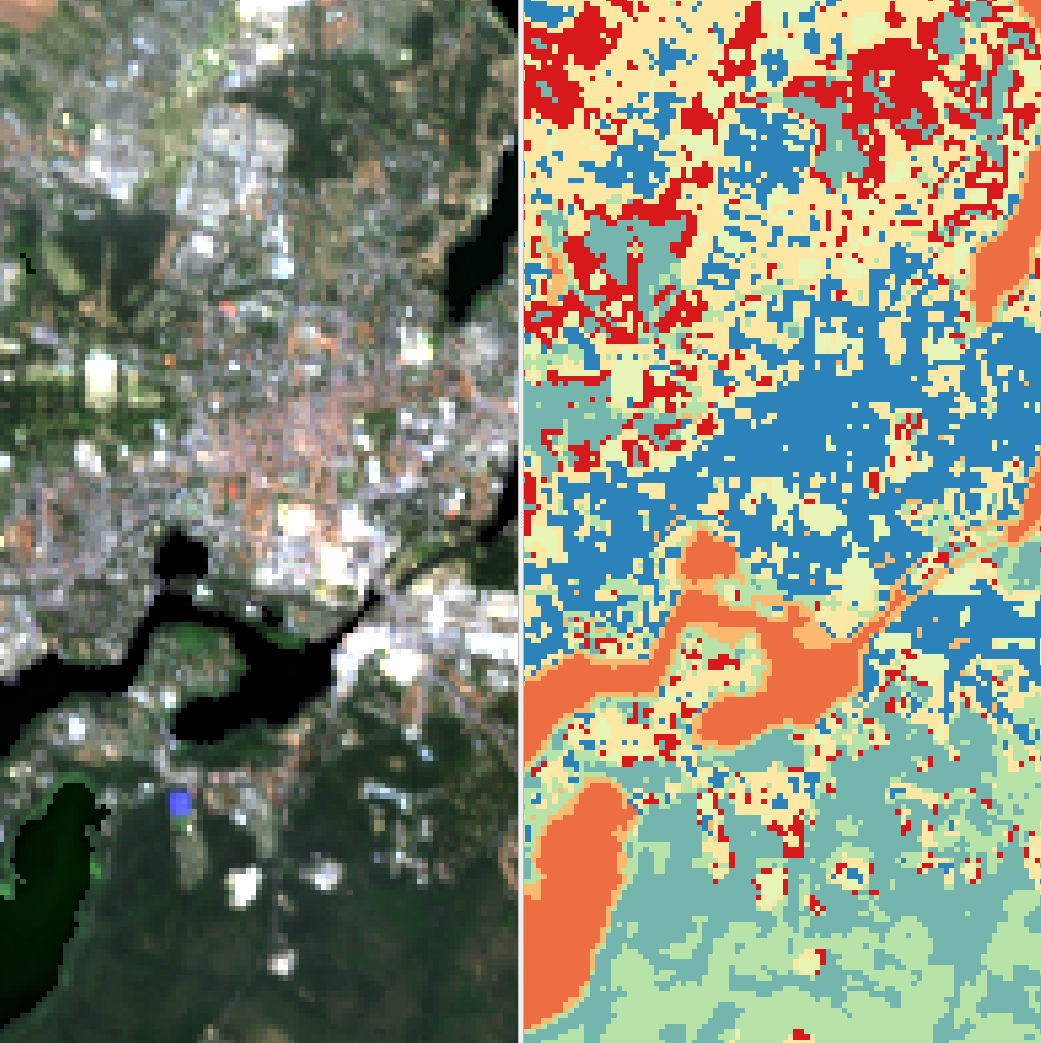
Fig. 9 EnMAP true color image (left) and kmeans cluster result with 8 clusters (right)
Tip
8 clusters is the default of the kmeans algorithm here, if you want to change the number of clusters, run the
Fit Kmeans algorithm with a fewer number, by altering the KMeans() function in the Code window to KMeans(n_clusters=4).
This will reduce the amount of clusters to 4.