Regression workflow
The regression workflow combines regressor fitting and map prediction.Optionally, the cross-validation performance of the regressor can be assessed.
Usage:
Start the algorithm from the Processing Toolbox panel.
Select a training dataset or create one by clicking the processing algorithm icon. Select a regressor and adjust its parameterization accordingly, then click run.
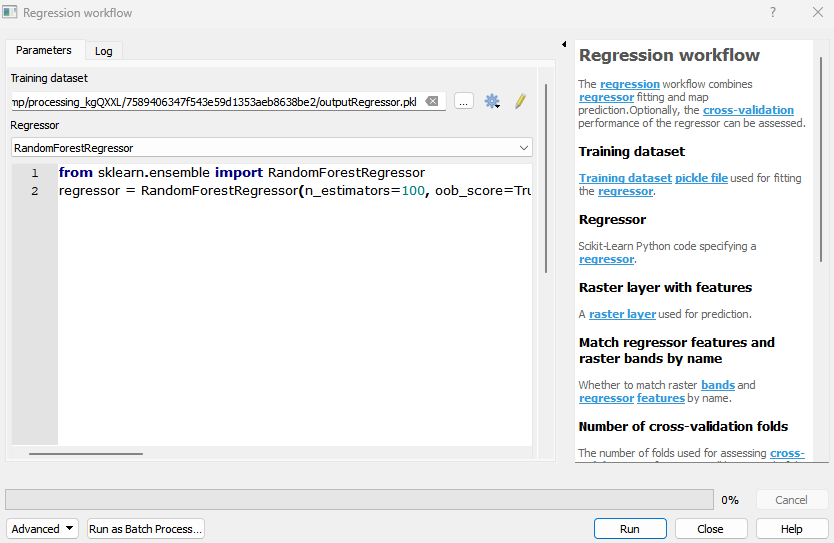
Live Demonstration
Parameters
- Training dataset [file]
Training dataset pickle file used for fitting the regressor.
- Regressor [string]
Scikit-Learn Python code specifying a regressor.
- Raster layer with features [raster]
A raster layer used for prediction.
- Match regressor features and raster bands by name [boolean]
Whether to match raster bands and regressor features by name. Default: False
- Number of cross-validation folds [number]
The number of folds used for assessing cross-validation performance. Will be ignored, if the cross-validation performance assessment is skipped. Default: 10
- Open output cross-validation regressor performance report in webbrowser after running algorithm [boolean]
Whether to open the cross-validation performance report in the web browser. Will be ignored, if the cross-validation performance assessment is skipped. Default: True
Outputs
- Output cross-validation regressor performance report [fileDestination]
Output cross-validation performance report file destination.
- Output regressor [fileDestination]
Pickle file destination.
- Output regression layer [rasterDestination]
Predicted map file destination.
Command-line usage
>qgis_process help enmapbox:regressionworkflow:
----------------
Arguments
----------------

dataset: Training dataset
    Argument type:    file
    Acceptable values:
        - Path to a file
regressor: Regressor
    Argument type:    string
    Acceptable values:
        - String value
        - field:FIELD_NAME to use a data defined value taken from the FIELD_NAME field
        - expression:SOME EXPRESSION to use a data defined value calculated using a custom QGIS expression
raster: Raster layer with features (optional)
    Argument type:    raster
    Acceptable values:
        - Path to a raster layer
matchByName: Match regressor features and raster bands by name (optional)
    Default value:    false
    Argument type:    boolean
    Acceptable values:
        - 1 for true/yes
        - 0 for false/no
        - field:FIELD_NAME to use a data defined value taken from the FIELD_NAME field
        - expression:SOME EXPRESSION to use a data defined value calculated using a custom QGIS expression
nfold: Number of cross-validation folds (optional)
    Default value:    10
    Argument type:    number
    Acceptable values:
        - A numeric value
        - field:FIELD_NAME to use a data defined value taken from the FIELD_NAME field
        - expression:SOME EXPRESSION to use a data defined value calculated using a custom QGIS expression
openReport: Open output cross-validation regressor performance report in webbrowser after running algorithm
    Default value:    true
    Argument type:    boolean
    Acceptable values:
        - 1 for true/yes
        - 0 for false/no
        - field:FIELD_NAME to use a data defined value taken from the FIELD_NAME field
        - expression:SOME EXPRESSION to use a data defined value calculated using a custom QGIS expression
outputRegressorPerformance: Output cross-validation regressor performance report (optional)
    Argument type:    fileDestination
    Acceptable values:
        - Path for new file
outputRegressor: Output regressor
    Argument type:    fileDestination
    Acceptable values:
        - Path for new file
outputRegression: Output regression layer (optional)
    Argument type:    rasterDestination
    Acceptable values:
        - Path for new raster layer

----------------
Outputs
----------------

outputRegressorPerformance: <outputHtml>
    Output cross-validation regressor performance report
outputRegressor: <outputFile>
    Output regressor
outputRegression: <outputRaster>
    Output regression layer